From Bot to Backend: Integrating OAuth Client Credentials with MCP Servers and Keycloak
Trying to integrate OAuth with the Model Context Protocol (MCP)? It's... rough. I tackled it using the Client Credentials flow for Morgana, my Discord bot, and while it works, it’s far from plug-and-play. Here’s how I got it running.

Before we begin…
OAuth implementation with MCP is still unstable and many implementations are considered as “suggestions”. This makes secure implementation (such on the federal scale) a bit harder to address.
This guide purposefully avoids topics such as multi-tenancy, role-based access control via scopes and claims, and dynamic client registration. It is mean to provide a baseline, straight forward implementation and example of integrating service-to-service authentication using Client Credentials in the OAuth specifications and flow. Use it as a foundation, not as pure reference!
Getting started
If you’re looking for an example of having your OpenAI client authenticate with OAuth to your API server, but have been coming up short, you’re not alone in company. The example below demonstrates the Client Credentials OAuth Flow, meaning there is no user interaction, and the Client ID and Client Secret are traded in exchange for an access_token. There will be future examples I plan to write a full user-interactive OAuth flow (e.g., browser-based authorization) in the future—but today is not that day.
Luckily, through my experimentation with JWT (and my years of bumbling around with Keycloak) it’s a bit more straight forward than you might think.
🔐 This documentation assumes that you have Keycloak, or an OAuth provider set up. All you’ll primarily need is your OAuth Client ID and Secret. The documentation also assumes that you have a client ready to integrate with. In this case, I have my NodeJS Discord bot, Morgana, ready to integrate with my API/MCP server.
We’ll be using the OAuth client ID and secret as part of this mini-tutorial. Because our backend is built with Express, we can plug in authentication middleware (keycloak.protect()) directly into the route handlers:
// MCP Handler - API is in .ts
server.post('/messages', logIncomingAuth, keycloak.protect(), async (req: Request, res: Response) => {
   // do stuff
}
⚠️ keycloak-connect is considered deprecated for Node-based projects! You may want to consider creating your own authentication middleware or use one that Keycloak will (eventually) recommend
You should be able to find more up-to-date information by searching for keycloak connect npm or by viewing their documentation. Again, while deprecated, Red Hat/Keycloak has yet to announce a suitable replacement.
Configuring your MCP Client
// ./src/utils/mcpClient.js
// This is a standalone 'class' or instance of the MCP Client that Morgana uses


async function connectMCP() {
  logger.info("Attempting to connect to MCP server")

  if (isConnecting) {
    logger.debug("MCP connection already in progress")
    return
  }

  isConnecting = true

  let tokenData = await fetchAccessToken()
  if (!tokenData) {
    logger.warn("No access token retrieved — MCP will not connect")
    isConnecting = false
    return
  }

  mcpToken = tokenData.token
  logger.debug(
    `Token expires at ${new Date(tokenData.expiresAt * 1000).toISOString()}`
  )

  const transport = new SSEClientTransport(new URL(mcpServerUrl), {
    requestInit: {
      headers: {
        authorization: `Bearer ${mcpToken}`,
      },
    },
    eventSourceInit: {
      async fetch(input, init = {}) {
        const headers = new Headers(init.headers || {})
        headers.set("authorization", `Bearer ${mcpToken}`)
        return fetch(input, { ...init, headers })
      },
    },
  })

  try {
    await mcpClient.close()
    logger.info("Closed previous MCP connection")
  } catch (err) {
    logger.warn("No existing MCP connection to close (or error closing):", err)
  }

  // Reinitialize
  const newClient = new McpClient(
    { name: "morgana", version: "4.0" },
    { capabilities: {} }
  )

  try {
    await newClient.connect(transport)
    logger.info("MCP connected!")
    const tools = await newClient.listTools()
    logger.debug("Available tools:", tools)
    mcpClient = newClient
  } catch (err) {
    logger.error("Failed to connect to MCP:", err)
    logger.warn("MCP tools will be unavailable until restart")
  }

  isConnecting = false
}

export { connectMCP, getMCPClient, stopMCP }
Retrieving the Access Token
import fetch from "node-fetch"
import { URLSearchParams } from "url"
import { logger } from "./logger.js"

let accessToken = ""
let tokenExpiresAt = 0 // epoch timestamp

export async function fetchAccessToken() {
  logger.info("Attempting to retrieve OAuth access token")
  const now = Math.floor(Date.now() / 1000)

  if (accessToken && now < tokenExpiresAt - 30) {
    logger.info("Current access token is still valid")
    return { token: accessToken, expiresAt: tokenExpiresAt } // still valid
  }

  const clientId = process.env.OAUTH_CLIENT_ID
  const clientSecret = process.env.OAUTH_CLIENT_SECRET
  const authUrl = process.env.OAUTH_BASE_URL
  const tokenUrl = `${authUrl}/realms/subspace/protocol/openid-connect/token`

  if (!clientId || !clientSecret) {
    logger.warn("OAuth client ID or secret not specified!")
    return
  }

  const params = new URLSearchParams()
  params.append("grant_type", "client_credentials")
  params.append("client_id", clientId)
  params.append("client_secret", clientSecret)

  const res = await fetch(tokenUrl, {
    method: "POST",
    body: params,
    headers: {
      "Content-Type": "application/x-www-form-urlencoded",
    },
  })

  // Report failure but don't hard fail out
  if (!res.ok) {
    const error = await res.text()
    logger.error("Failed to fetch access token", error)
    return
  }

  const json = await res.json()
  accessToken = json.access_token
  tokenExpiresAt = now + json.expires_in
  logger.debug("Retrieved access token", accessToken)
  logger.info(
    `Access token valid until ${new Date(
      tokenExpiresAt * 1000
    ).toLocaleString()}`
  )
  return { token: accessToken, expiresAt: tokenExpiresAt }
}
fetchAccessToken() performs a POST call to the token OAuth endpoints which is what mcpClient.js uses in its Authorization header. The method I’ve written avoids re-authenticating on every request unless needed, and respects the token expiry time with a 30 second buffer.
My full implementation of the OAuth flow is still, most likely, not entirely best practice. For example, I still believe I am not managing the MCP session state properly by keeping the Transport Session alive after a tool call is made instead of closing it.
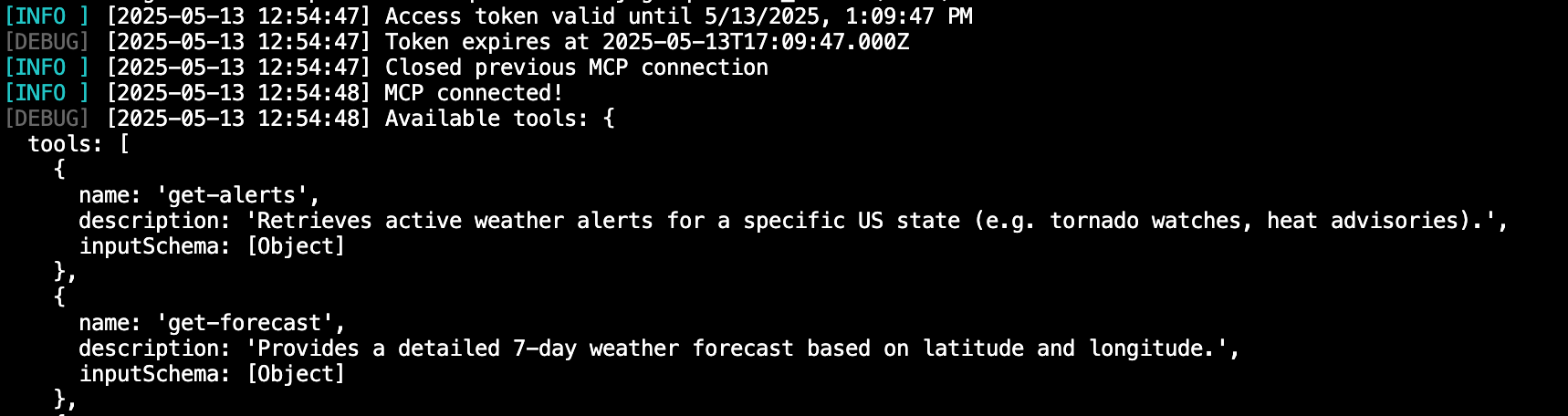
Picture of Morgana’s logs authenticating with Keycloak, to the subspace-api MCP and API server
Configuring Keycloak (or your own OAuth service)
It does not entirely matter if you have Keycloak or not, as it primarily would affect what middlewares you run, if you are running Express-based backends. For OAuth, to get started all you really need is a client.
The OAuth client you create should have generated a secret (you typically provide the ID itself). You will want to ensure that Direct Access Grants, Service Account Roles, and Client Authentication (which sets the OIDC client type to CONFIDENTIAL) is enabled or checked:
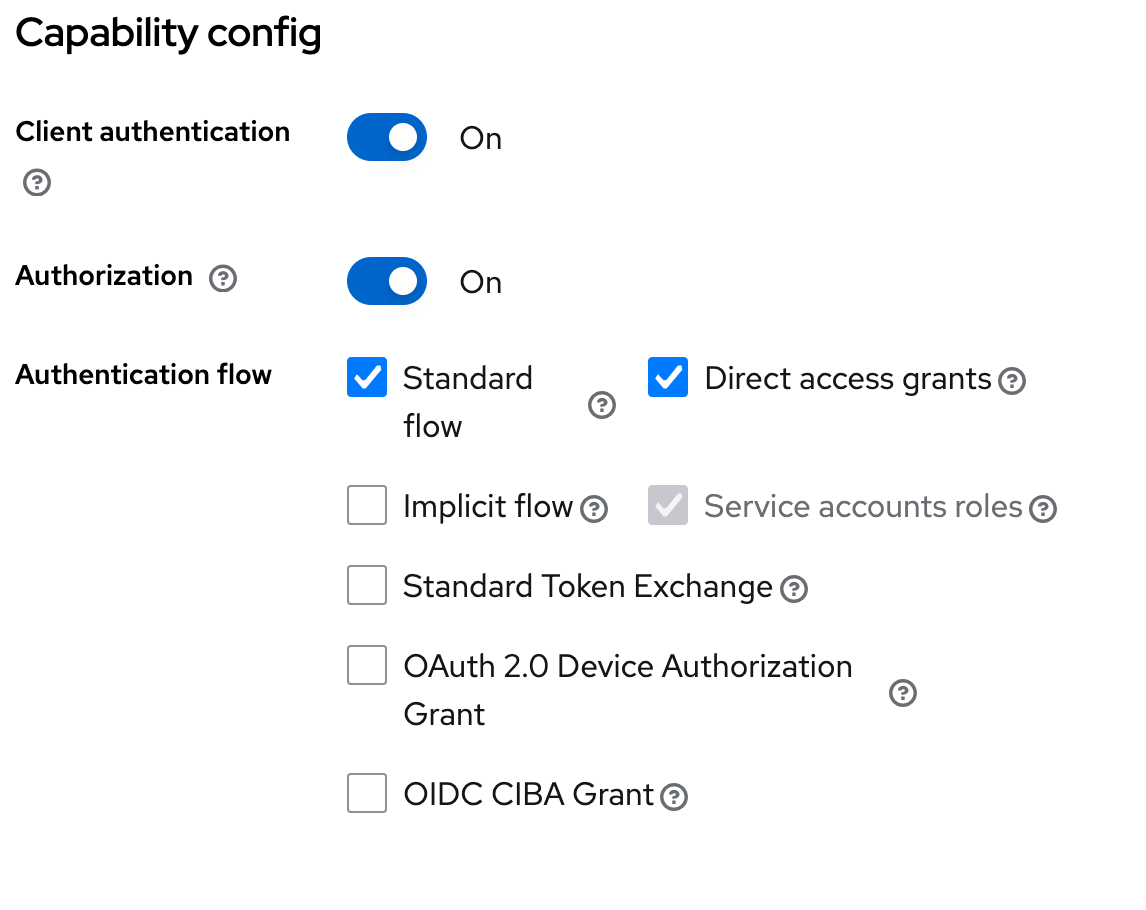
In my case, I had to add a OIDC Scope that had a dedicated mapper to add the audience claim that both our MCP Client and Server were expecting.
And that’s pretty much it! Nothing too fancy for now, but I will be exploring my options to include fine-grained access control to specific tools the MCP server has available based on the access account a client is using.
Wanna see the project(s) as reference? Peep below:
GitHub - subtype-space/subspace-api An express-based RESTful API and Model Context Protocol (MCP) server for services used by subtype.space. Please note the GitHub repository is a downstream mirror, and updates may be late. GitHub