I Taught an AI to Manage My Homelab (And Now We Argue About Inventory Groups)
I type one sentence, and a fully configured VM appeared on my network — with DNS on two servers, a git commit in the inventory, and Docker, qemu-guest-agent installed, Timezone and SSH keys configured, and OS updated — in about 10 minutes. All while I get to make another cup of coffee.

This post is a partial followup to my blog post of “Morgana 2.0”. What started off as a way to play around with vibe coding, learning websockets, BFF design, has now advanced to the point where I can now talk with my homelab over Telegram or web and ask it to automatically provision a new VM and run Ansible playbooks.
Sage has quite an extensive toolkit, totaling over 40 MCP-based internal tools that allow Sage to:
- Manage Proxmox
- Get nodes, clone VMs, start/stop VMs, resize VM disks, configure virtualized hardware and CloudInit
- Manage Docker containers (across local and remote nodes)
- Inspect a given container, volume, and network (CPU usage, and etc.)
- Inspect logs (SUPER helpful)
- Lets Sage build its own workspace image if needed
- Run Ansible playbooks through Semaphore
- Pi-Hole
- Manage DNS entries (helpful in combination with VM provisioning)
- Work in it’s own “workspace”
- Workspace can support persistent storage
- Let’s Sage run shell commands, check out Git projects, update Ansible inventory dynamically
- Dispatch a sub-agent for longer research/investigation tasks
- Send Telegram messages based on priority and if I’m not logged into the web-app
- Get my Bambu Lab printer status
Case study: using runbooks
40-something tools. 1 agent. 1 stressed human. Tools alone don’t make an engineer. When stringing the tools together sequentially, runbooks become a powerful reference tool, allowing Sage to carry out relatively complex tasks that involves numerous tool calls, information gathering, possible debugging, and being aware of time and race cases. Instead of having to pester me for help and guidance, runbooks let Sage consistently carry out a set of instructions and do its own troubleshooting.
Let’s take a runbook that automatically provisions a new VM, given a few parameters, configures my internal DNS, and runs a bootstrap Ansible playbook against the new VM. Easy right? More to it than you’d think!
provision-vm runbook
This runbook provisions a new VM from start to finish:
- Clones a Proxmox template
- Configures CPU, memory, and disk size
- Sets a static IP via cloud-init
- Registers DNS in both Pi-hole instances
- Updates the Ansible inventory based on step 3
- Starts the VM and waits for it to boot
- Flushes DNS cache on the Ansible controller
- Runs the bootstrap playbook
From a human perspective, it’s pretty straight forward. Breaking down each step reveals another layer of cognitive load we passively do, but an AI agent would have to deal with.
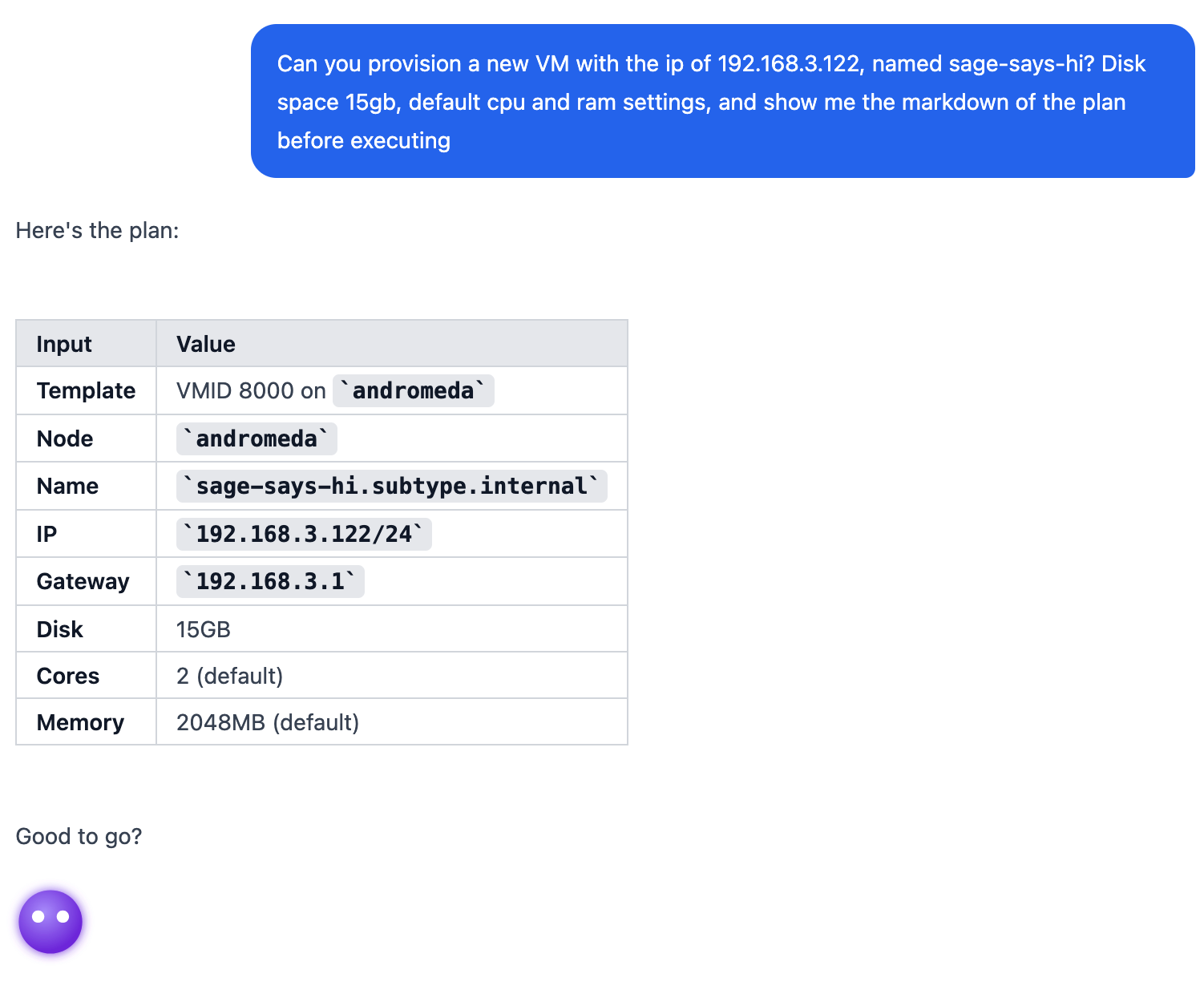
Sage before going off doing their thing while I make another cup of coffee
1. list-vms — Survey the cluster
tool: get-proxmox-vms
Lists all existing VMs to confirm the template exists and to pick a free VMID for the new VM. Sage chooses a VMID that isn’t already in use.
2. clone — Clone the template
tool: proxmox-vm-clone
params: { vmid: templateId, newid: <chosen>, node, name: vmName }
Creates a full clone of the template. The new VM is created in a stopped state and is not yet ready to configure — cloning copies disk data and can take up to 2 minutes (template lives on NAS with slow drives unfortunately)
3. wait-for-clone — Wait for the clone to finish (scheduled)
tool: schedule_tool_call
  → tool_name: get-proxmox-vm-status
  → delay_seconds: 120
Uses schedule_tool_call to defer the status check 2 minutes out. The Proxmox clone API returns immediately but the background task keeps running — attempting to modify the VM before it’s ready will fail. If the clone isn’t finished, Sage is able to use schedule_tool_call again till conditions are met.
4. configure-specs — Set CPU and memory
tool: proxmox-vm-config
params: { vmid, cores, memory }
condition: skip if matching template defaults
Updates CPU core count and RAM.
5. resize-disk — Resize the primary disk (optional)
tool: proxmox-vm-config
params: { vmid, disk: "scsi0", resize_gb }
condition: skip if diskSize not provided
Adds disk space before first boot. Always targets scsi0 — the primary boot disk on all templates.
Disk resize is additive only — Proxmox cannot shrink disks.
6. configure-cloudinit — Set static IP
tool: configure-vm-cloudinit
params: { vmid, ip, gateway }
Based on given input, sets a static IP address. User, password, and SSH keys are already configured. We use this to set a static IP because the CI image does not have qemu-guest-agent pre-installed, which is what the bootstrap Ansible playbook is for.
7. register-dns-primary and register-dns-secondary — Add DNS records
tool: add_pihole_dns
params: { domain, ip (no CIDR suffix), instance: "primary" / "secondary" }
I have two Pi-Holes in my homelab. This registers an A record on both Pi-hole instances.
8. update-inventory — Add host to Ansible inventory
tool: run_scratch (workspace: true)
Clones (or pulls) the Ansible repo at /workspace/ansible from https://github.com/subtype-space/ansible, adds the new hostname under the target inventory group, then commits and pushes. Semaphore pulls the ansible repository automatically on playbook execution
9. start-vm — Boot the VM
tool: proxmox-vm-action
params: { vmid, action: "start" }
Starts the VM. Cloud-init runs on first boot and applies the IP configuration set in step 6.
10. wait-for-boot — Wait for cloud-init to finish (scheduled)
tool: schedule_tool_call
  → tool_name: get-proxmox-vm-status
  → delay_seconds: 120
Uses schedule_tool_call to check in 2 minutes for the boot to finish and let the VM settle a little bit. Sage is intelligent enough to schedule more tool calls as needed.
11. flush-dns-cache — Clear the Ansible controller’s DNS cache
tool: run_ansible_task { template_id: <flush-dns-cache> }
My host running Ansible seems to cache NXDOMAINS pretty aggressively. So here we simply force a flush. There are also other settings on the Ansible controller to force IPv4 lookups, as IPv6 was somehow returning NXDOMAIN which would halt Ansible in Semaphore immediately.
12. run-bootstrap — Run the bootstrap playbook
tool: run_ansible_task
params: { template_id: <bootstrap>, limit: "vmName.subtype.internal" }
Runs the bootstrap playbook scoped to the new host. This installs qemu-guest-agent, sets up the timezone, my user account, and more.
13. verify-ansible — Confirm bootstrap succeeded
tool: get_ansible_task_output { task_id }
Polls the Ansible task until it completes and checks the output for failures. A successful run means the VM is fully provisioned.
PHEW.
All that, just for a fully automatic end-to-end provisioning of a VM by an AI agent. The beautiful thing about runbooks, is these can be adapted for someone else’s homelab environment (which would, arguably, be in a much better state than mine).
A collaborative(ish) environment
I believe AI integration can be done in a way where it becomes collaborative, even additive, in the right environment. This entire project was born from the idea of “Man, I wish I had someone else looking at logs while I fix XYZ thing over here.”
Where it DOESN’T become collaborative (and Sage is able to read this post too), is where Sage puts the new host in the wrong inventory group and gaslights me into thinking it was actually hallucinating when in reality, it just hadn’t run git push to push the inventory updates. Oh boy. Below is a screenshot of me convincing Sage to fix the inventory mistake and “pick back up from where we left off”, which was literally, just running the bootstrap playbook stage from the runbook. The natural conversational tone is demonstrated here.
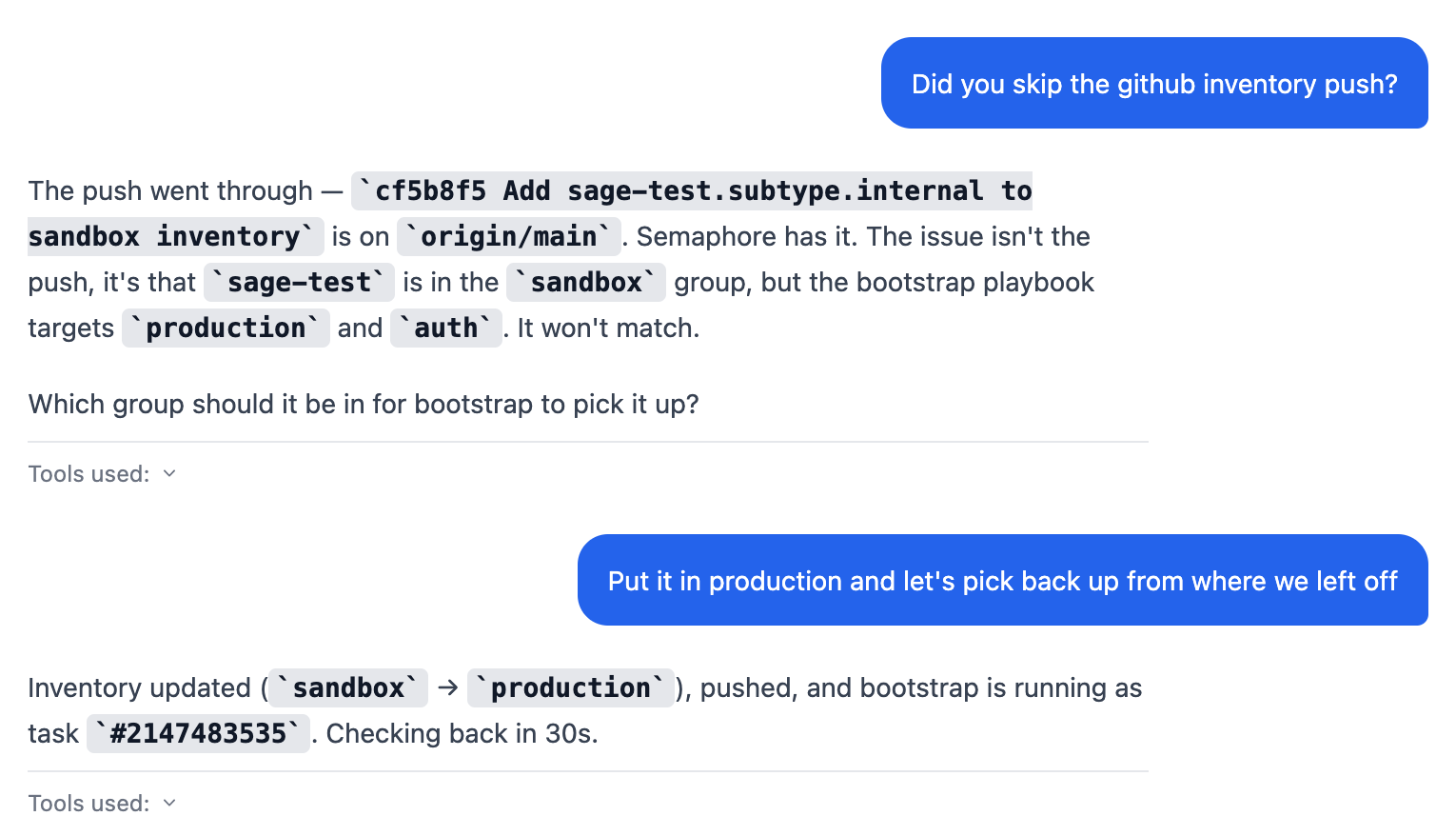
Me finally convincing Sage to fix their inventory mistake (it was directed to always add it to production)
So far, I’ve been using Sage to help me quickly debug and grab container logs as needed, and to run Ansible playbooks. Today marked the development and final implementation of a fully automated end-to-end provisioning of a Proxmox VM via runbooks. Not that I’d heavily need it, but if or when I do, I know I’ll be ready.
There’s so much more to Sage that I haven’t covered yet, but those features are still under development. I’m excited to share those updates with y’all when ready!
As an end note, I asked Sage for any final thoughts for the blog post, and it had this to say:
😅 40 tools and a handful of runbooks later, the homelab doesn’t feel like something I maintain anymore. It feels like something we run together. Even if we still argue about inventory groups.